Codex 放飞自我的终极命令 + AGENTS_md 生成提示词,让你来去自如

终极命令

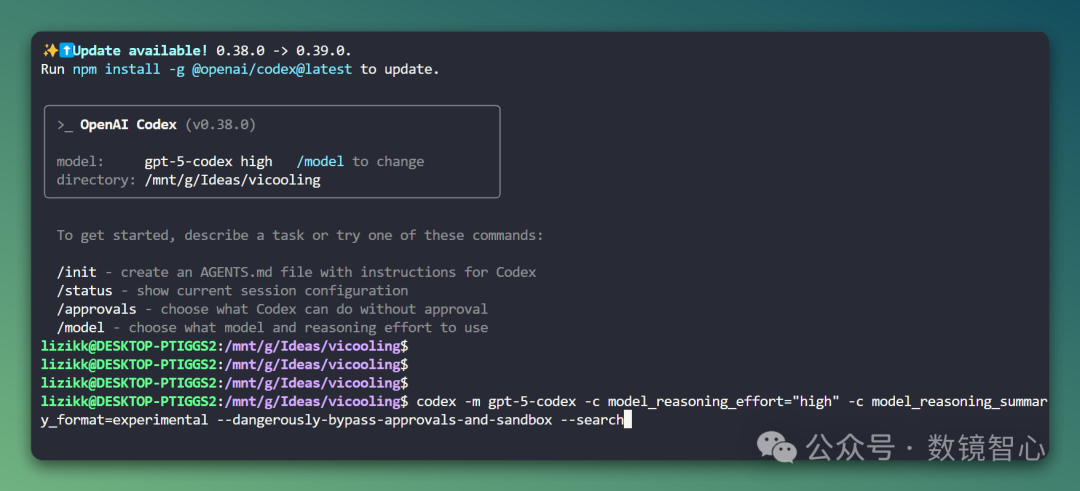
用 Claude Code 的朋友们都知道 –dangerously-skip-permissions ,每次输入是多么痛苦的一件事,Codex 也不例外。

教你一行命令放飞自我
同理,参考这样使用 Claude Code 让你的开发效率提升 17 倍:从入门到精通的实战技巧与避坑指南

你可以把下面的 alias 放到~/.bashrc,source 下就可以只用 codex 玩耍了

1
2
alias codex='codex -m gpt-5-codex -c model_reasoning_effort="high" -c model_reasoning_summary_format=experimental --dangerously-bypass-approvals-and-sandbox --search'

简单解释,这个命令就是默认启动

  1. gpt-5-codex high 模型,调高推理力度

  2. 用实验格式总结输出

  3. 但危险地绕过安全审批和隔离

  4. 开启搜索

AGENTS.md 生成的 Prompt

AGENTS.md 是啥?

简单解释就是就是一个 Markdown 文件格式,专门用来指导 AI 编码代理(比如 OpenAI 的 Codex)怎么跟你的代码项目打交道,就跟 README.md 是给人看的说明书一样,但这个是给大模型看的。 它提供项目上下文、指令啥的,已经被 2 万多个开源项目用了。

ClaudeCode 中这个对标的文件叫 CLAUDE.md。

有同学问,/init 不就可以生成么,没错,但是可以把提示词存下来用在其他任何编程 IDE,比如 Cursor、Windsurf、Augment、Cline 等,为你生成 OpenAI 格式的 AGENTS.md 文件。

Prompt:

1
2
3
4
5
6
7
8
9
10
11
12
13
14
15
16
17
18
19
20
21
22
23
24
25
26
27
# Generate a file named AGENTS.md that serves as a contributor guide for this repository.
  Your goal is to produce a clear, concise, and well-structured document with descriptive headings and actionable explanations for each section.
  Follow the outline below, but adapt as needed — add sections if relevant, and omit those that do not apply to this project. 
# Document Requirements
  - Title the document "Repository Guidelines".
  - Use Markdown headings (#, ##, etc.) for structure.
  - Keep the document concise. 200-400 words is optimal.
  - Keep explanations short, direct, and specific to this repository.
  - Provide examples where helpful (commands, directory paths, naming patterns).                                              
  - Maintain a professional, instructional tone.                                                                              
# Recommended Sections                                                                                                        
 ## Project Structure & Module Organization                                                                                     
  - Outline the project structure, including where the source code, tests, and assets are located.                            
 ## Build, Test, and Development Commands                                                                                       
  - List key commands for building, testing, and running locally (e.g., npm test, make build).                                
  - Briefly explain what each command does.                                                                                   
 ## Coding Style & Naming Conventions                                                                                           
  - Specify indentation rules, language-specific style preferences, and naming patterns.                                      
  - Include any formatting or linting tools used.                                                                             
 ## Testing Guidelines                                                                                                          
  - Identify testing frameworks and coverage requirements.                                                                    
  - State test naming conventions and how to run tests.                                                                       
 ## Commit & Pull Request Guidelines                                                                                            
  - Summarize commit message conventions found in the project’s Git history.                                                  
  - Outline pull request requirements (descriptions, linked issues, screenshots, etc.).                                       
 (Optional) Add other sections if relevant, such as Security & Configuration Tips, Architecture Overview, or Agent-Specific Instructions. 

关于如何国内使用原味 claudecode 和 codex,参看之前文章 ClaudeCode 工程师亲述:为什么你的 AI Agent 总是 “智障”?问题可能出在工具设计上,文末有福利。

栗子 KK,

一个在 AI 浪潮中游泳的 AI 产品 Founder
传统技能不能丢,点赞、在看、关注 三连走起,让我们一起聊科技、聊产品、聊未来 🚀

同时,欢迎评论区留言交流~