在使用 FastMCP 开发 MCP 服务器时经常会用到 @mcp.tool() 等装饰器。虽然它们用起来很简单,但当作黑匣子总让人感觉”不得劲”。接下来我们将深入相关的源码实现,别担心,不会钻没有意义的“兔子洞 ”,你可以通过这篇文章了解到:
如何简单启动本地的 MCP Server 和 MCP Inspector
这些装饰器具体做了什么
@mcp.tool()
@mcp.resource()
@mcp.prompt()
MCP 官方 Python SDK 地址:https://github.com/modelcontextprotocol/python-sdk 。
需要注意的是,Python>=3.10 才可以安装 MCP,后续的前置文章会更新这一点,包括过去可能过时的所有代码文件版本。
(写在前面 :说声抱歉,迟到很久的更新。这段时间因为DDL太多,下意识地回避了仓库 & 邮件。计划 8 月会对目前存在的 Issues 和 PR 全部进行处理 & 更新所有文件的 uv 命令 & 并在李宏毅老师的许可下对今年的 Homework 进行跟进。另外 FastMCP() 的初始化讲解会在之后完结。届时会删除这个“Flag” :) )
代码文件下载 :server.py ,debug_func_metadata.py ,debug_message_validator.py
安装库 server.py 下面是一个简化的 server.py 示例:
1 2 3 4 5 6 7 8 9 10 11 12 13 14 15 16 17 18 19 20 21 22 23 24 25 26 27 28 29 30 31 32 33 34 35 36 37 38 39 40 41 42 43 44 45 from mcp.server.fastmcp import FastMCPmcp = FastMCP( name="weather" , ) @mcp.tool() def get_weather (city: str ) -> str : """获取指定城市的天气信息""" weather_data = { "北京" : "晴天,温度 22°C" , "上海" : "多云,温度 25°C" , "广州" : "小雨,温度 28°C" , "深圳" : "阴天,温度 26°C" } return weather_data.get(city, f"{city} 的天气数据暂不可用" ) <!-- more --> @mcp.prompt() def weather (city: str = "北京" ) -> list : """提供天气查询的对话模板""" return [ { "role" : "user" , "content" : f"请帮我查询{city} 的天气情况,并提供详细的天气信息。" } ] @mcp.resource("resource://cities" def get_cities (): """返回支持查询天气的城市列表""" cities = ["北京" , "上海" , "广州" , "深圳" ] return f"Cities: {', ' .join(cities)} " @mcp.resource("resource://{city}/weather" def get_city_weather (city: str ) -> str : return f"Weather for {city} " if __name__ == "__main__" : mcp.run(transport="stdio" )
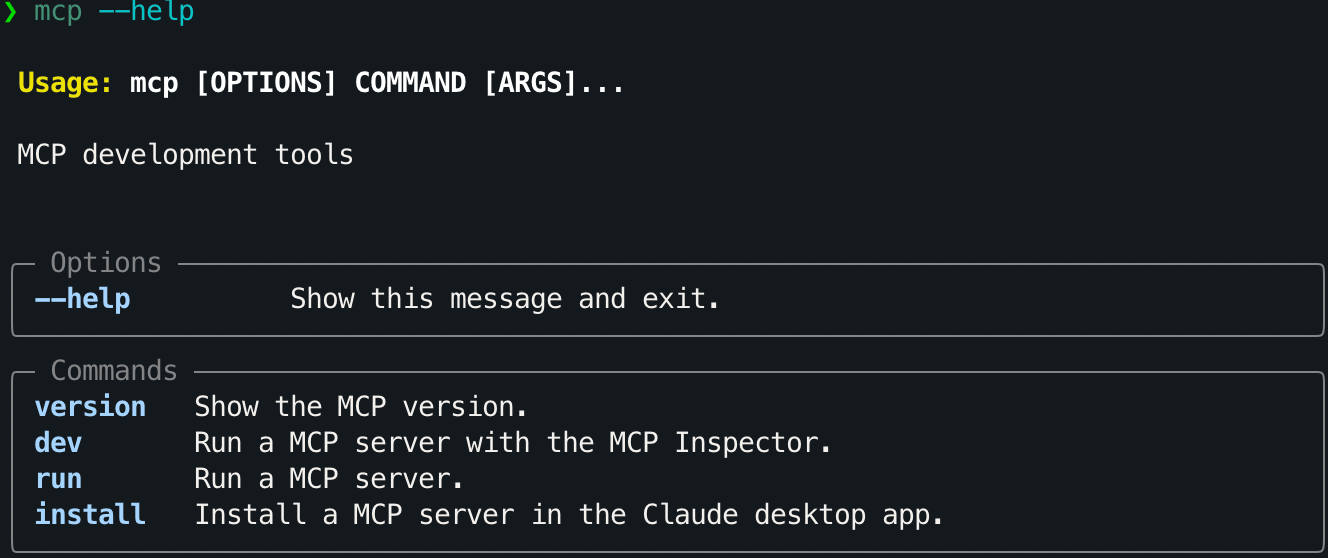
将其保存为 server 后,可以使用以下命令直接进行调试:
mcp dev 会在运行MCP服务器的同时启动 MCP Inspector:
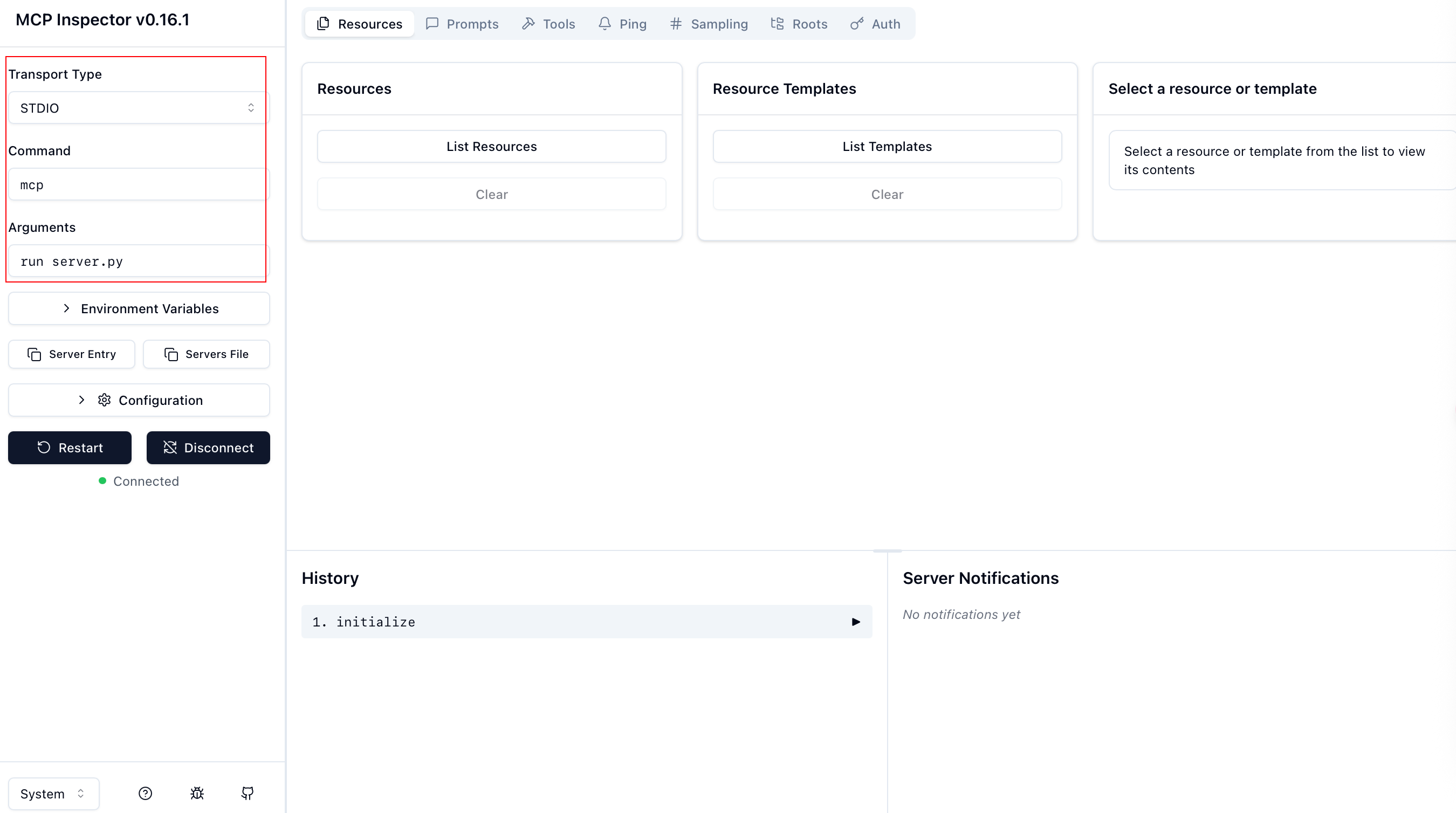
MCP Inspector 界面配置如下图左框:
配置项(Command + Arguments)实际对应于能够运行服务器的命令,所以并不局限,有很多组合可以使用:
Command
Arguments
mcp
run server.py
python
server.py
uv
run server.py
uv
run mcp run server.py
uv
run –with mcp mcp run server.py
uv
run python server.py
最后三行命令实际只是 uv 对前两行命令的封装(uv 可以替代 pip/conda,目前已经被广泛使用)。
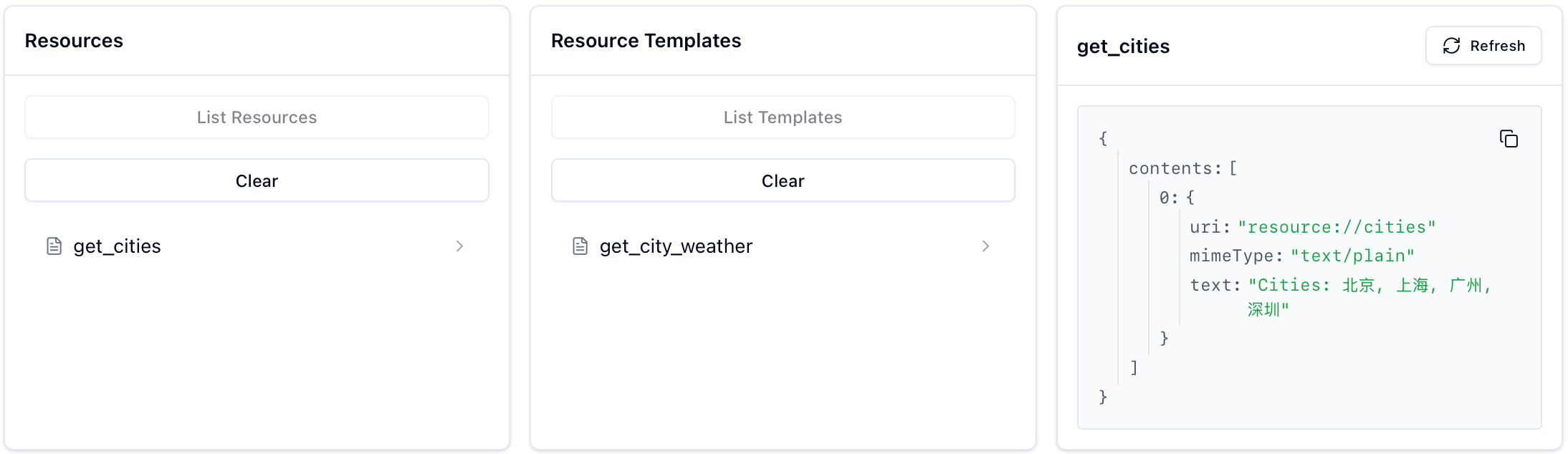
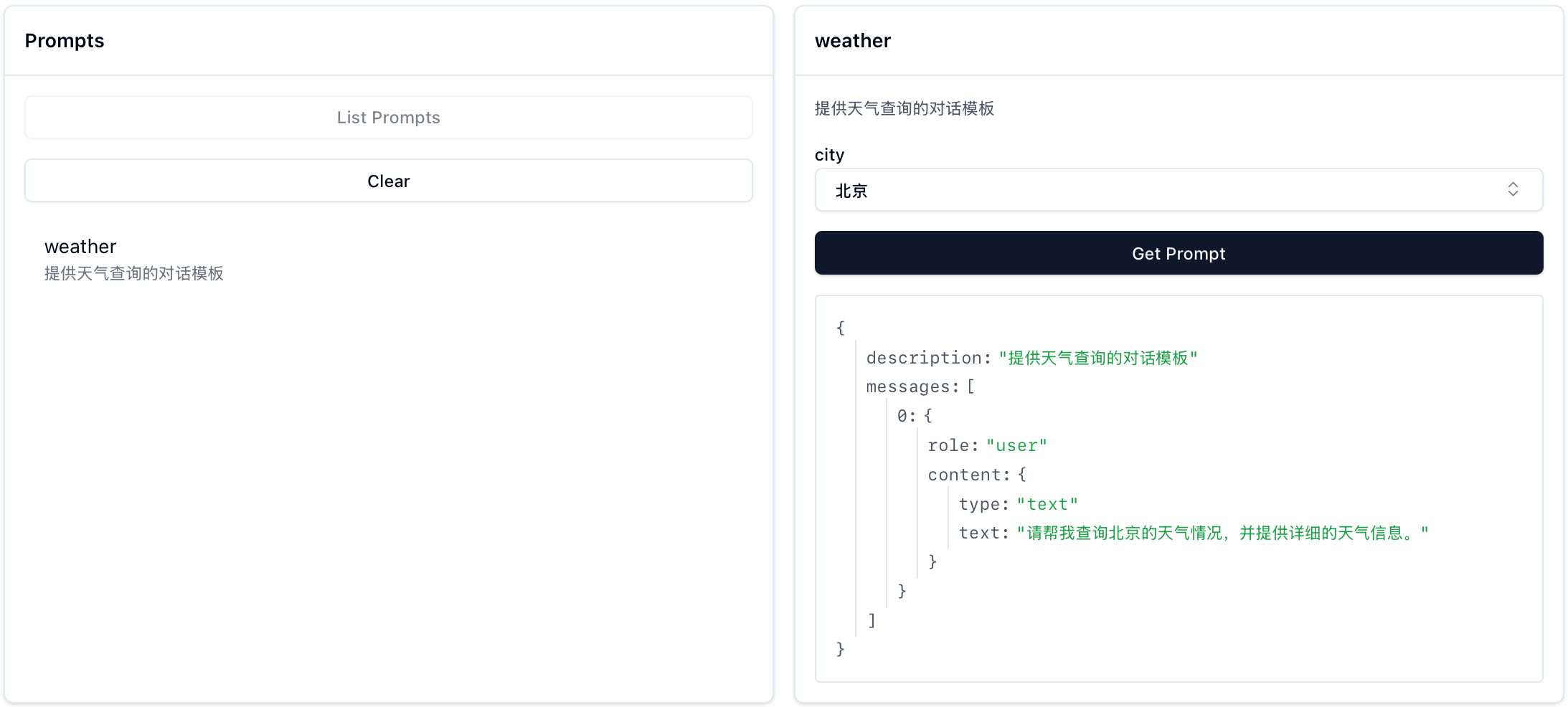
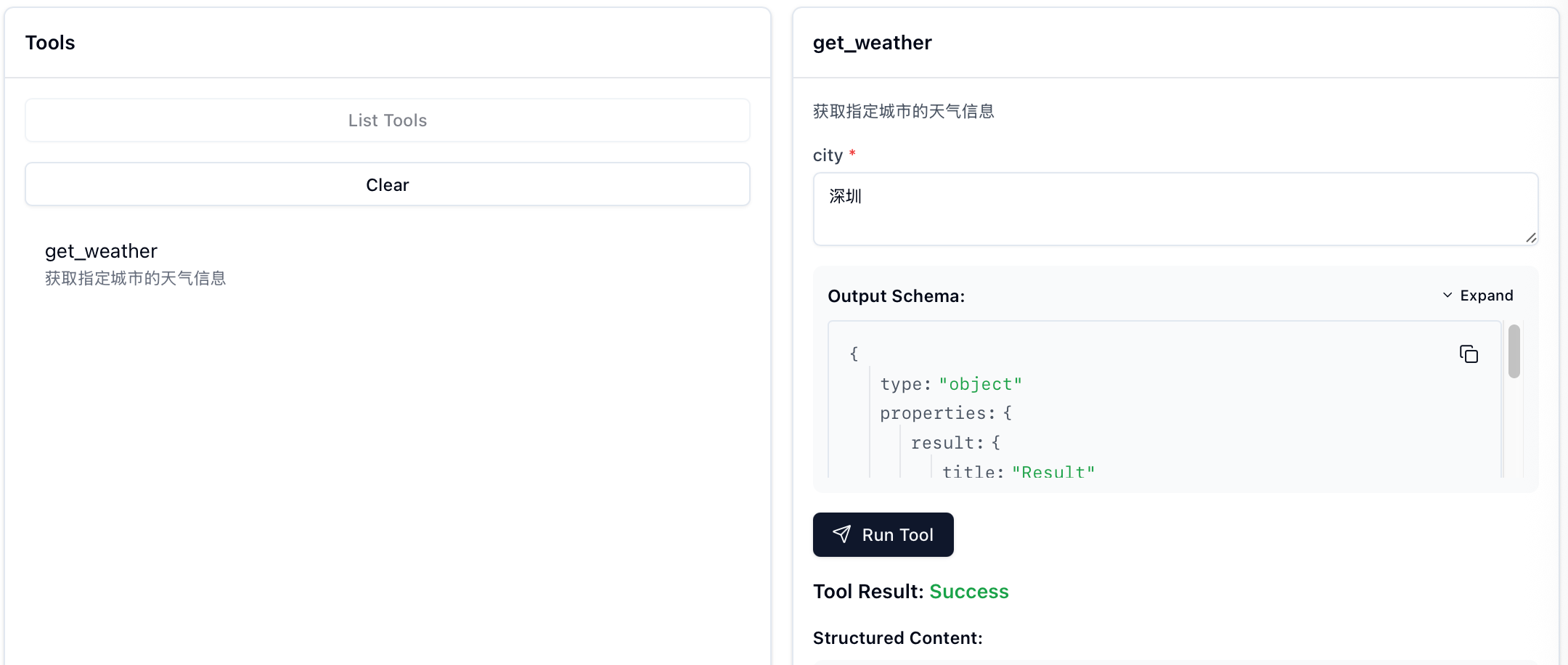
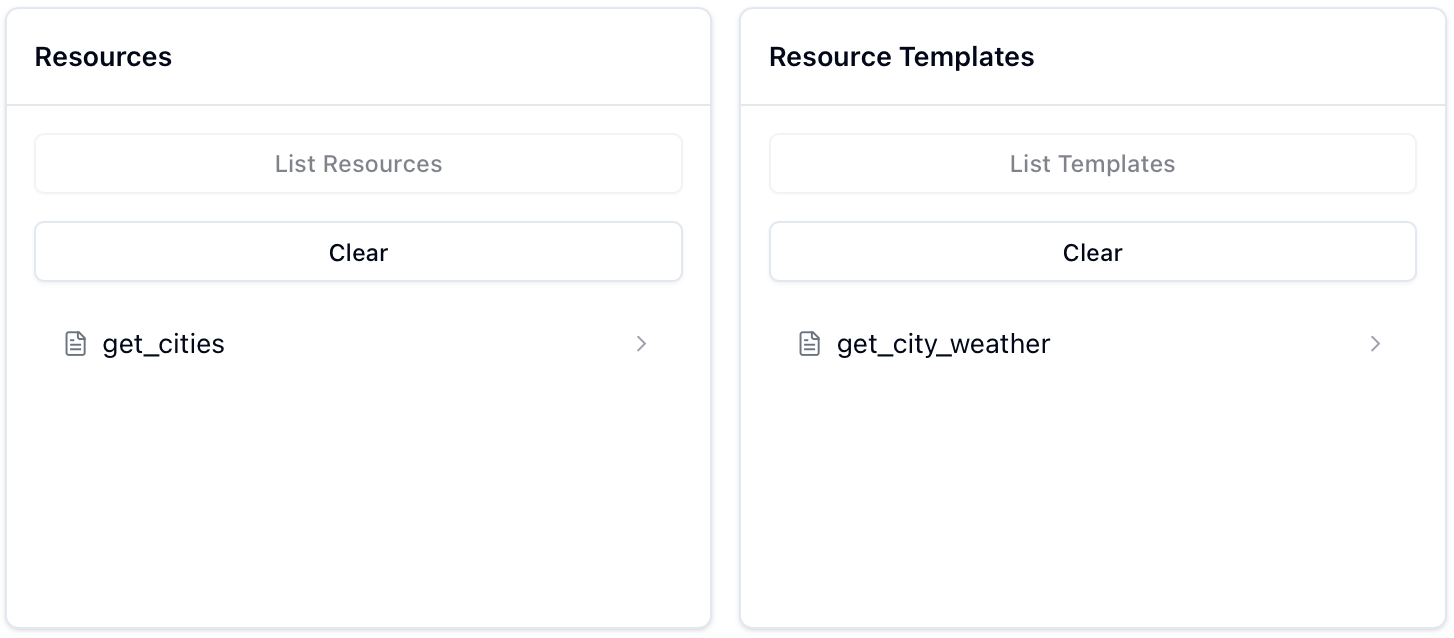
连接成功后,你可以在 MCP Inspector 中看到注册的 Resources、Prompts 和 Tools:
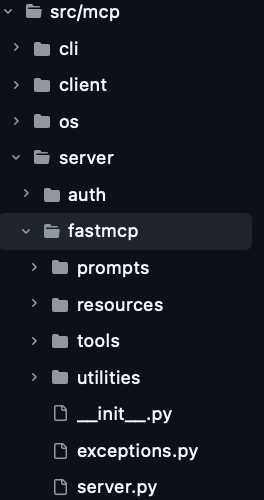
什么是 FastMCP? 官方仓库中对应的路径为 src/mcp/server/fastmcp :
从 from mcp.server.fastmcp import FastMCP 开始,既然能够直接 import FastMCP,那先查看 __init__.py:
1 2 3 4 5 6 7 8 9 """FastMCP - 一个更人性化的 MCP 服务器接口。""" from importlib.metadata import versionfrom .server import Context, FastMCPfrom .utilities.types import Image__version__ = version("mcp" ) __all__ = ["FastMCP" , "Context" , "Image" ]
可以看到 FastMCP 是从当前文件夹的 server.py 中导入的,所以接下来查看 server.py (省略部分初始化逻辑):
1 2 3 4 5 6 7 8 9 10 11 12 13 14 15 16 17 18 19 class FastMCP : def __init__ ( self, name: str | None = None , instructions: str | None = None , auth_server_provider: OAuthAuthorizationServerProvider[Any , Any , Any ] | None = None , token_verifier: TokenVerifier | None = None , event_store: EventStore | None = None , *, tools: list [Tool] | None = None , **settings: Any , ): ... self ._tool_manager = ToolManager(tools=tools, warn_on_duplicate_tools=self .settings.warn_on_duplicate_tools) self ._resource_manager = ResourceManager(warn_on_duplicate_resources=self .settings.warn_on_duplicate_resources) self ._prompt_manager = PromptManager(warn_on_duplicate_prompts=self .settings.warn_on_duplicate_prompts) ...
初始化(__init__)的代码中有三个很眼熟的部分:
_tool_manager:管理工具(Tools)_resource_manager:管理资源(Resources)_prompt_manager:管理提示词(Prompts)
这三者分别对应于之后要介绍的装饰器。
FastMCP 初始化的具体解析不会在本文进行,后续相关文章完结时此行会替换为索引链接。
装饰器 什么是装饰器? 装饰器可以理解为一个接受函数作为参数,并返回一个新函数的函数。这可以让我们在不修改原函数代码的情况下添加通用的行为,通过一个简单的例子来理解:
1 2 3 4 5 6 7 8 9 10 11 12 13 14 15 16 17 18 19 20 def decorator (func ): """一个简单的装饰器示例""" def wrapper (*args, **kwargs ): print (f"调用函数 {func.__name__} 之前" ) result = func(*args, **kwargs) print (f"调用函数 {func.__name__} 之后\n" ) return result return wrapper @decorator def say_hello (name ): print (f"Hello, {name} !" ) say_hello("Xiaoming" ) def say_hello (name ): print (f"Hello, {name} !" ) say_hello = decorator(say_hello) say_hello("Xiaoming" )
输出 :
1 2 3 4 5 6 7 调用函数 say_hello 之前 Hello, Xiaoming! 调用函数 say_hello 之后 调用函数 say_hello 之前 Hello, Xiaoming! 调用函数 say_hello 之后
在 FastMCP 中,装饰器的工作方式类似,但并不是简单地 print,而是将函数注册到对应的管理器中:
@mcp.tool() - 将函数注册为工具@mcp.resource() - 将函数注册为资源@mcp.prompt() - 将函数注册为提示词模板
接下来会着重讲解 tool() 装饰器,resource() 和 prompt() 的处理逻辑基本是 tool() 的简化版本,所以部分逻辑会带过。
Note: >@mcp.* 的格式是因为初始化 mcp=FastMCP(),如果变量名从 mcp 改为了 server,即:server=FastMCP(),那么装饰器就应该使用 @server.* 的格式。
@mcp.tool() 装饰器用于将 Python 函数自动注册为当前 mcp 服务器中的工具。摘选之前的片段:
1 2 3 4 5 6 7 8 9 10 11 @mcp.tool() def get_weather (city: str ) -> str : """获取指定城市的天气信息""" weather_data = { "北京" : "晴天,温度 22°C" , "上海" : "多云,温度 25°C" , "广州" : "小雨,温度 28°C" , "深圳" : "阴天,温度 26°C" } return weather_data.get(city, f"{city} 的天气数据暂不可用" )
这段代码实际上会:
自动提取函数的参数类型信息,以及文档字符串(下面的信息由之后的 debug_func_metadata 打印)。
1 2 3 4 5 6 7 8 9 10 11 12 13 14 15 ============================================================ 🔍 开始解析函数: get_weather 文档字符串: 获取指定城市的天气信息 ============================================================ 函数签名分析: 完整签名: (city: str) -> str 返回类型: <class 'str'> 参数数量: 1 参数名: city 原始注解: <class 'str'> 参数种类: POSITIONAL_OR_KEYWORD 默认值: <class 'inspect._empty'> 类型化注解: <class 'str'> 字段信息: annotation=<class 'str'>, default=PydanticUndefined
生成参数的 JSON Schema(函数名+Arguments)。
1 2 3 4 5 6 7 8 9 10 11 12 13 14 15 16 17 18 19 🏗️ 创建 Pydantic 模型: 模型名称: get_weatherArguments 基类: <class 'mcp.server.fastmcp.utilities.func_metadata.ArgModelBase'> ✅ 模型创建成功: <class '__main__.get_weatherArguments'> get_weatherArguments JSON Schema: { "properties" : { "city" : { "title" : "City" , "type" : "string" } } , "required" : [ "city" ] , "title" : "get_weatherArguments" , "type" : "object" }
将函数注册为 MCP 工具(self._tools[tool.name] = tool)。
mcp.tool() 可以接受以下参数(此处参数解释参考 tool 和 func_metadata ):
name : 可选的工具名称,默认为函数名
title : 可选的工具标题(用于人类阅读)
description : 可选的工具功能描述,默认使用函数的文档字符串
annotations : 可选的 ToolAnnotations,提供额外的工具信息
structured_output :控制工具输出是结构化还是非结构化的
Note: >@mcp.tool(),可以跳过下面的源码部分。
追溯源码 1 2 3 4 5 6 7 8 9 10 11 12 13 14 15 16 17 18 19 20 21 22 23 24 25 26 27 28 29 30 31 32 33 class FastMCP : ... def tool ( self, name: str | None = None , title: str | None = None , description: str | None = None , annotations: ToolAnnotations | None = None , structured_output: bool | None = None , ) -> Callable [[AnyFunction], AnyFunction]: """用于注册工具的装饰器。 工具可以通过添加 Context 类型注解的参数来可选地请求一个 Context 对象。 Context 提供对 MCP 功能的访问,包括日志记录、进度报告和资源访问。 """ if callable (name): raise TypeError( "The @tool decorator was used incorrectly. Did you forget to call it? Use @tool() instead of @tool" ) def decorator (fn: AnyFunction ) -> AnyFunction: self .add_tool( fn, name=name, title=title, description=description, annotations=annotations, structured_output=structured_output, ) return fn return decorator
这里的 self.add_tool() 就是 mcp.add_tool(),所以也可以不使用装饰器达到一样的目的:
1 2 3 4 5 def get_weather (): pass mcp = FastMCP(name="weather" ) mcp.add_tool(get_weather)
这一行为最终调用的是 self._tool_manager.add_tool(),self._tool_manager 在__init__() 中对应的是 tools/tool_manager.py 中的 ToolManager 类:
1 2 3 4 5 6 7 8 9 10 11 12 13 14 15 16 17 18 19 20 21 22 23 24 25 26 27 28 29 30 31 32 33 34 35 36 37 38 39 40 41 42 43 class ToolManager : """管理 FastMCP 工具.""" def __init__ ( self, warn_on_duplicate_tools: bool = True , *, tools: list [Tool] | None = None , ): self ._tools: dict [str , Tool] = {} if tools is not None : for tool in tools: if warn_on_duplicate_tools and tool.name in self ._tools: logger.warning(f"Tool already exists: {tool.name} " ) self ._tools[tool.name] = tool self .warn_on_duplicate_tools = warn_on_duplicate_tools def add_tool ( self, fn: Callable [..., Any ], name: str | None = None , title: str | None = None , description: str | None = None , annotations: ToolAnnotations | None = None , structured_output: bool | None = None , ) -> Tool: """添加 tool 到 server。""" tool = Tool.from_function( fn, name=name, title=title, description=description, annotations=annotations, structured_output=structured_output, ) existing = self ._tools.get(tool.name) if existing: if self .warn_on_duplicate_tools: logger.warning(f"Tool already exists: {tool.name} " ) return existing self ._tools[tool.name] = tool return tool
我们不需要关注 ToolManager 是怎么进行管理的,这不重要,重要的是装饰器怎么处理我们自定义的函数。
整个 @mcp.tool() 装饰器的工作按执行顺序可以拆分为:
装饰器检查调用方式是否正确(必须带括号),然后将被装饰的函数传递给 ToolManager.add_tool() 。
1 2 3 4 5 6 7 8 9 10 11 12 13 14 15 16 17 18 19 class FastMCP : ... def tool (self, name, ... ): if callable (name): raise TypeError( "The @tool decorator was used incorrectly. Did you forget to call it? Use @tool() instead of @tool" ) def decorator (fn: AnyFunction ) -> AnyFunction: self .add_tool( fn, name=name, title=title, description=description, annotations=annotations, structured_output=structured_output, ) return fn return decorator
Tool.from_function() 处理函数元数据
1 2 3 4 5 6 7 8 9 10 11 12 class ToolManager : ... def add_tool (self, ... ): tool = Tool.from_function( fn, name=name, title=title, description=description, annotations=annotations, structured_output=structured_output, ) ...
Note: >tool = Tool.from_function(...) 是当前最重要的处理部分,对应代码位于 tools/base.py ,其主要步骤如下(代码按顺序拼接等价于 Tool.from_function() ,出于讲解目的将其进行了拆分):
a. 解析函数签名,提取参数信息 。
1 2 3 4 5 6 7 8 9 10 11 12 13 14 15 16 17 18 19 20 21 22 23 24 25 26 class Tool (BaseModel ): ... @classmethod def from_function ( cls, fn: Callable [..., Any ], name: str | None = None , title: str | None = None , description: str | None = None , context_kwarg: str | None = None , annotations: ToolAnnotations | None = None , structured_output: bool | None = None , ) -> Tool: """从函数创建工具.""" from mcp.server.fastmcp.server import Context func_name = name or fn.__name__ if func_name == "<lambda>" : raise ValueError("You must provide a name for lambda functions" ) func_doc = description or fn.__doc__ or "" is_async = _is_async_callable(fn) ...
b. 自动检测 Context 参数 , inspect.signature() 会遍历函数的所有参数,检查参数类型是否为 Context 的子类,如果是的话会记录为 context_kwarg,这个参数会被传入 func_metadata() 的 skip_names(可以跳过这一步的理解,等真正涉及到的时候再探究),不会出现在工具对应的 JSON Schema 中。
1 2 3 4 5 6 7 8 9 10 11 12 13 14 15 16 class Tool (BaseModel ): ... @classmethod def from_function (... ): ... if context_kwarg is None : sig = inspect.signature(fn) for param_name, param in sig.parameters.items(): if get_origin(param.annotation) is not None : continue if issubclass (param.annotation, Context): context_kwarg = param_name break
c. 生成参数的 JSON Schema :
1 2 3 4 5 6 7 8 9 10 11 12 13 class Tool (BaseModel ): ... @classmethod def from_function (... ): ... func_arg_metadata = func_metadata( fn, skip_names=[context_kwarg] if context_kwarg is not None else [], structured_output=structured_output, ) parameters = func_arg_metadata.arg_model.model_json_schema(by_alias=True )
func_metadata 相关源代码位于 utilities/func_metadata.py ,这里我们进行主体逻辑的抽取打印(完整 debug_func_metadata 函数见附录 ):
1 2 3 4 5 6 7 8 9 10 def func ( data, format : str = "json" , count: Optional [int ] = None , validate: bool = True """展示各种注解情况""" return data debug_func_metadata(func, skip_names="count" )
输出 :
1 2 3 4 5 6 7 8 9 10 11 12 13 14 15 16 17 18 19 20 21 22 23 24 25 26 27 28 29 30 31 32 33 34 35 36 37 38 39 40 41 42 43 44 45 46 47 48 49 50 51 52 53 54 55 56 57 58 59 60 61 62 63 64 65 66 67 68 69 70 71 72 73 74 75 76 77 78 79 80 81 82 83 84 85 86 87 88 89 90 91 ============================================================ 🔍 开始解析函数: func 文档字符串: 展示各种注解情况 ============================================================ 📋 函数签名分析: 完整签名: (data, format: str = 'json', count: Optional[ int] = None, validate: bool = True) 返回类型: <class 'inspect._empty'> 参数数量: 4 🔧 参数处理详情: 跳过的参数名: [ 'c', 'o', 'u', 'n', 't'] [ 1 ] 参数名: data 原始注解: <class 'inspect._empty'> 参数种类: POSITIONAL_OR_KEYWORD 默认值: <class 'inspect._empty'> ⚠️ 处理: 无类型注解,默认为 Any 🔄 类型化注解: typing.Annotated[ typing.Any, FieldInfo(annotation=NoneType, required=True), WithJsonSchema(json_schema={ 'title': 'data', 'type': 'string'} , mode=None)] ✅ 字段信息: annotation=typing.Any, default=PydanticUndefined [ 2 ] 参数名: format 原始注解: <class 'str'> 参数种类: POSITIONAL_OR_KEYWORD 默认值: json 🔄 类型化注解: <class 'str'> ✅ 字段信息: annotation=<class 'str'>, default=json [ 3 ] 参数名: count 原始注解: typing.Optional[ int] 参数种类: POSITIONAL_OR_KEYWORD 默认值: None ⏭️ 跳过此参数 [ 4 ] 参数名: validate 原始注解: <class 'bool'> 参数种类: POSITIONAL_OR_KEYWORD 默认值: True 🔄 类型化注解: <class 'bool'> ✅ 字段信息: annotation=<class 'bool'>, default=True ⚠️ 冲突处理: 参数名 'validate' 与 BaseModel 方法冲突 -> 使用内部名称: field_validate 📊 参数处理总结: 总参数数: 4 处理参数数: 3 模型字段: [ 'data', 'format', 'field_validate'] 🏗️ 创建 Pydantic 模型: 模型名称: funcArguments 基类: <class 'mcp.server.fastmcp.utilities.func_metadata.ArgModelBase'> ✅ 模型创建成功: <class '__main__.funcArguments'> 📄 funcArguments JSON Schema: { "properties" : { "data" : { "title" : "data" , "type" : "string" } , "format" : { "default" : "json" , "title" : "Format" , "type" : "string" } , "validate" : { "default" : true , "title" : "Validate" , "type" : "boolean" } } , "required" : [ "data" ] , "title" : "funcArguments" , "type" : "object" } 🎯 返回值处理: structured_output 参数: None 返回注解: <class 'inspect._empty'> 经过_get_typed_annotation处理后的类型: <class 'inspect._empty'> ℹ️ 未创建输出模型 wrap_output: False ✨ func_metadata 处理完成! 最终结果: arg_model=<class '__main__.funcArguments'> output_schema=None output_model=None wrap_output=False ============================================================ FuncMetadata(arg_model=<class '__main__.funcArguments'>, output_schema=None, output_model=None, wrap_output=False)
d. 创建 Tool 实例(Tool.from_function 的 return cls(...)) 。
1 2 3 4 5 6 7 8 9 10 11 12 13 14 15 class Tool (BaseModel ): ... @classmethod def from_function (... ): return cls( fn=fn, name=func_name, title=title, description=func_doc, parameters=parameters, fn_metadata=func_arg_metadata, is_async=is_async, context_kwarg=context_kwarg, annotations=annotations, )
将 Tool 实例注册到工具管理器中 。
1 2 3 4 5 6 7 8 9 10 11 12 class ToolManager : ... def add_tool (... ) -> Tool: """添加 tool 到 server。""" tool = Tool.from_function(...) existing = self ._tools.get(tool.name) if existing: if self .warn_on_duplicate_tools: logger.warning(f"Tool already exists: {tool.name} " ) return existing self ._tools[tool.name] = tool return tool
@mcp.resource() @mcp.resource() 装饰器用于定义可供访问的资源,需要注意的是:
追溯源码 查看 server.py 中的 resource 方法:
1 2 3 4 5 6 7 8 9 10 11 12 13 14 15 16 17 18 19 20 21 22 23 24 25 26 27 28 29 30 31 32 33 34 35 36 37 38 39 40 41 42 43 44 45 46 47 48 49 50 51 52 53 54 55 56 57 58 59 60 61 62 63 64 65 66 67 68 69 70 71 72 73 74 75 76 77 78 79 80 81 82 83 84 85 class FastMCP : ... def resource ( self, uri: str , *, name: str | None = None , title: str | None = None , description: str | None = None , mime_type: str | None = None , ) -> Callable [[AnyFunction], AnyFunction]: """用于将函数注册为资源的装饰器。 当资源被读取时,将调用被装饰的函数来动态生成资源内容。 函数可以返回: - str: 文本内容 - bytes: 二进制内容 - 其他类型: 将自动转换为 JSON 格式 如果 URI 包含参数占位符(如 "resource://{param}")或者函数本身有参数, 该资源将被注册为模板资源。 参数: uri: 资源的 URI(如 "resource://my-resource" 或 "resource://{param}") name: 可选的资源名称 title: 可选的资源标题(用于人类阅读) description: 可选的资源描述 mime_type: 可选的 MIME 类型 使用示例: # 静态资源 @server.resource("resource://my-resource") def get_data() -> str: return "Hello, world!" # 参数化模板资源 @server.resource("resource://{city}/weather") def get_weather(city: str) -> str: return f"Weather for {city}" """ if callable (uri): raise TypeError( "The @resource decorator was used incorrectly. Did you forget to call it? Use @resource('uri') instead of @resource" ) def decorator (fn: AnyFunction ) -> AnyFunction: has_uri_params = "{" in uri and "}" in uri has_func_params = bool (inspect.signature(fn).parameters) if has_uri_params or has_func_params: uri_params = set (re.findall(r"{(\w+)}" , uri)) func_params = set (inspect.signature(fn).parameters.keys()) if uri_params != func_params: raise ValueError( f"Mismatch between URI parameters {uri_params} and function parameters {func_params} " ) self ._resource_manager.add_template( fn=fn, uri_template=uri, name=name, title=title, description=description, mime_type=mime_type, ) else : resource = FunctionResource.from_function( fn=fn, uri=uri, name=name, title=title, description=description, mime_type=mime_type, ) self .add_resource(resource) return fn return decorator
ResourceManager 的实现位于 resources/resource_manager.py :
1 2 3 4 5 6 7 8 9 10 11 12 13 14 15 16 17 18 19 20 21 22 23 24 25 26 27 28 29 30 31 32 33 34 35 36 37 38 39 40 41 42 43 44 45 46 47 48 49 50 51 52 53 54 class ResourceManager : """管理 FastMCP 资源。""" def __init__ (self, warn_on_duplicate_resources: bool = True ): self ._resources: dict [str , Resource] = {} self ._templates: dict [str , ResourceTemplate] = {} self .warn_on_duplicate_resources = warn_on_duplicate_resources def add_resource (self, resource: Resource ) -> Resource: """向管理器中添加资源。 参数: resource: 要添加的 Resource 实例 返回: 当前添加的资源。如果具有相同 URI 的资源已存在,则返回现有的资源。 """ logger.debug( "Adding resource" , extra={ "uri" : resource.uri, "type" : type (resource).__name__, "resource_name" : resource.name, }, ) existing = self ._resources.get(str (resource.uri)) if existing: if self .warn_on_duplicate_resources: logger.warning(f"Resource already exists: {resource.uri} " ) return existing self ._resources[str (resource.uri)] = resource return resource def add_template ( self, fn: Callable [..., Any ], uri_template: str , name: str | None = None , title: str | None = None , description: str | None = None , mime_type: str | None = None , ) -> ResourceTemplate: """根据函数添加模版。""" template = ResourceTemplate.from_function( fn, uri_template=uri_template, name=name, title=title, description=description, mime_type=mime_type, ) self ._templates[template.uri_template] = template return template ...
对于静态资源,add_resource 方法会直接将 FunctionResource 实例存储在 _resources 字典中。对于动态资源,add_template 方法会创建 ResourceTemplate 实例并存储在 _templates 字典中。
静态 :FunctionResource 位于 resources/types.py :
1 2 3 4 5 6 7 8 9 10 11 12 13 14 15 16 17 18 19 20 21 22 23 24 25 26 27 28 29 30 31 32 33 34 35 36 37 38 39 40 41 class FunctionResource (Resource ): """通过包装函数来延迟加载数据的资源。 函数只有在资源被读取时才会被调用,允许对可能昂贵的数据进行延迟加载。 这在列出资源时特别有用,因为函数不会被调用,直到资源被实际访问。 函数可以返回: - str 表示文本内容(默认) - bytes 表示二进制内容 - 其他类型将被转换为 JSON """ fn: Callable [[], Any ] = Field(exclude=True ) ... @classmethod def from_function ( cls, fn: Callable [..., Any ], uri: str , name: str | None = None , title: str | None = None , description: str | None = None , mime_type: str | None = None , ) -> "FunctionResource" : """从函数创建 FunctionResource。""" func_name = name or fn.__name__ if func_name == "<lambda>" : raise ValueError("You must provide a name for lambda functions" ) fn = validate_call(fn) return cls( uri=AnyUrl(uri), name=func_name, title=title, description=description or fn.__doc__ or "" , mime_type=mime_type or "text/plain" , fn=fn, )
动态 :ResourceTemplate 位于 resources/templates.py :
1 2 3 4 5 6 7 8 9 10 11 12 13 14 15 16 17 18 19 20 21 22 23 24 25 26 27 28 29 30 31 32 33 34 35 36 37 38 39 40 41 class ResourceTemplate (BaseModel ): """动态创建资源的模板。""" uri_template: str = Field(description="URI template with parameters (e.g. weather://{city}/current)" ) name: str = Field(description="Name of the resource" ) title: str | None = Field(description="Human-readable title of the resource" , default=None ) description: str | None = Field(description="Description of what the resource does" ) mime_type: str = Field(default="text/plain" , description="MIME type of the resource content" ) fn: Callable [..., Any ] = Field(exclude=True ) parameters: dict [str , Any ] = Field(description="JSON schema for function parameters" ) @classmethod def from_function ( cls, fn: Callable [..., Any ], uri_template: str , name: str | None = None , title: str | None = None , description: str | None = None , mime_type: str | None = None , ) -> ResourceTemplate: """从函数创建模板。""" func_name = name or fn.__name__ if func_name == "<lambda>" : raise ValueError("You must provide a name for lambda functions" ) parameters = TypeAdapter(fn).json_schema() fn = validate_call(fn) return cls( uri_template=uri_template, name=func_name, title=title, description=description or fn.__doc__ or "" , mime_type=mime_type or "text/plain" , fn=fn, parameters=parameters, )
@mcp.prompt() @mcp.prompt() 装饰器用于定义提示词模板,这部分的实现只是简单维护了一个字典。
追溯源码 查看 server.py 中的 prompt 方法:
1 2 3 4 5 6 7 8 9 10 11 12 13 14 15 16 17 18 19 20 21 22 23 24 25 26 27 28 29 30 31 32 33 34 35 36 37 38 39 40 41 42 43 44 45 46 47 48 49 50 51 52 53 54 55 56 57 58 59 60 class FastMCP : ... def prompt ( self, name: str | None = None , title: str | None = None , description: str | None = None , annotations: PromptAnnotations | None = None , ) -> Callable [[AnyFunction], AnyFunction]: """注册提示词的装饰器。 参数: name: 可选的提示词名称(默认使用函数名) title: 可选的提示词人类可读标题 description: 可选的提示词功能描述 使用示例: @server.prompt() def analyze_table(table_name: str) -> list[Message]: schema = read_table_schema(table_name) return [ { "role": "user", "content": f"Analyze this schema:\n{schema}" } ] @server.prompt() async def analyze_file(path: str) -> list[Message]: content = await read_file(path) return [ { "role": "user", "content": { "type": "resource", "resource": { "uri": f"file://{path}", "text": content } } } ] """ if callable (name): raise TypeError( "The @prompt decorator was used incorrectly. Did you forget to call it? Use @prompt() instead of @prompt" ) def decorator (func: AnyFunction ) -> AnyFunction: prompt = Prompt.from_function( func, name=name, title=title, description=description ) self .add_prompt(prompt) return func return decorator
PromptManager 的实现位于 prompts/prompt_manager.py :
1 2 3 4 5 6 7 8 9 10 11 12 13 14 15 16 17 18 19 20 21 22 23 24 25 class PromptManager : """管理 FastMCP 提示词。""" def __init__ (self, warn_on_duplicate_prompts: bool = True ): self ._prompts: dict [str , Prompt] = {} self .warn_on_duplicate_prompts = warn_on_duplicate_prompts def add_prompt (self, prompt: Prompt ) -> Prompt: """添加提示词到管理器。""" logger.debug(f"Adding prompt: {prompt.name} " ) existing = self ._prompts.get(prompt.name) if existing: if self .warn_on_duplicate_prompts: logger.warning(f"Prompt already exists: {prompt.name} " ) return existing self ._prompts[prompt.name] = prompt return prompt def get_prompt (self, name: str ) -> Prompt | None : """根据名称获取提示词。""" return self ._prompts.get(name) def list_prompts (self ) -> list [Prompt]: """列出所有已注册的提示词。""" return list (self ._prompts.values())
P.S. 文章跳过了 from_function 部分的源码追溯(感兴趣的同学可以点击链接查看)。
Note: >
1 2 3 4 5 6 7 8 9 @mcp.prompt() def weather (city: str = "北京" ) -> list : """提供天气查询的对话模板""" return [ { "role" : "user" , "content" : f"请帮我查询{city} 的天气情况,并提供详细的天气信息。" } ]
其实我们也可以这样写:
1 2 3 4 @mcp.prompt() def weather (city: str = "北京" ) -> str : """提供天气查询的对话模板""" return f"请帮我查询{city} 的天气情况,并提供详细的天气信息。"
最终客户端获取的对象都是:
1 2 3 4 5 6 7 8 9 10 11 { "messages" : [ { "role" : "user" , "content" : { "type" : "text" , "text" : "请帮我查询北京的天气情况" } } ] }
简单来说,如果被装饰的函数直接返回字符串类型,就会被转换为 UserMessage 对象(字典等类型的处理返回见附录的 debug_message_validator.py 运行结果)。
那么,这个自动转换的逻辑在哪实现呢?
当 MCP 客户端请求提示词时,FastMCP 会调用对应 Prompt 的 render() 方法:
1 2 3 4 5 6 7 8 9 10 11 12 13 14 15 16 17 18 19 class FastMCP : ... async def get_prompt (self, name: str , arguments: dict [str , Any ] | None = None ) -> GetPromptResult: """通过 name 和 arguments 获取提示词。""" try : prompt = self ._prompt_manager.get_prompt(name) if not prompt: raise ValueError(f"Unknown prompt: {name} " ) messages = await prompt.render(arguments) return GetPromptResult( description=prompt.description, messages=pydantic_core.to_jsonable_python(messages), ) except Exception as e: logger.exception(f"Error getting prompt {name} " ) raise ValueError(str (e))
这个方法位于 prompts/base.py :
1 2 3 4 5 6 7 8 9 10 11 12 13 14 15 16 17 18 19 20 21 22 23 24 25 26 27 28 29 30 31 32 33 34 35 36 37 38 39 40 41 42 43 44 45 46 47 48 49 50 51 class Prompt (BaseModel ): ... async def render (self, arguments: dict [str , Any ] | None = None ) -> list [Message]: """根据arguments渲染提示词。""" if self .arguments: required = {arg.name for arg in self .arguments if arg.required} provided = set (arguments or {}) missing = required - provided if missing: raise ValueError(f"Missing required arguments: {missing} " ) try : result = self .fn(**(arguments or {})) if inspect.iscoroutine(result): result = await result if not isinstance (result, list | tuple ): result = [result] messages: list [Message] = [] for msg in result: try : if isinstance (msg, Message): messages.append(msg) elif isinstance (msg, dict ): messages.append(message_validator.validate_python(msg)) elif isinstance (msg, str ): content = TextContent(type ="text" , text=msg) messages.append(UserMessage(content=content)) else : content = pydantic_core.to_json(msg, fallback=str , indent=2 ).decode() messages.append(Message(role="user" , content=content)) except Exception: raise ValueError(f"Could not convert prompt result to message: {msg} " ) return messages except Exception as e: raise ValueError(f"Error rendering prompt {self.name} : {e} " )
附录
官方源码:utilities/func_metadata.py
调试文件下载 :debug_func_metadata.py
1 2 3 4 5 6 7 8 9 10 11 12 13 14 15 16 17 18 19 20 21 22 23 24 25 26 27 28 29 30 31 32 33 34 35 36 37 38 39 40 41 42 43 44 45 46 47 48 49 50 51 52 53 54 55 56 57 58 59 60 61 62 63 64 65 66 67 68 69 70 71 72 73 74 75 76 77 78 79 80 81 82 83 84 85 86 87 88 89 90 91 92 93 94 95 96 97 98 99 100 101 102 103 104 105 106 107 108 109 110 111 112 113 114 115 116 117 118 119 120 121 122 123 124 125 126 127 128 129 130 131 132 133 134 135 136 137 138 139 140 141 142 143 144 145 146 147 148 149 150 151 152 153 154 155 156 157 158 159 160 161 162 163 164 165 166 167 168 169 170 171 172 173 174 175 176 177 178 179 180 181 182 183 184 185 186 187 188 189 190 191 192 193 194 195 196 197 198 199 200 201 202 203 204 205 206 207 208 209 210 211 212 213 214 215 216 217 218 219 220 221 222 223 224 225 226 227 228 229 230 231 232 233 234 235 236 237 238 239 240 241 242 243 244 245 246 247 248 249 250 251 252 """ func_metadata 调试工具,可以保存为 debug_func_metadata.py 执行 """ import inspectimport jsonfrom typing import Any , Callable , Sequence , Optional , List , Dict from pydantic import BaseModel, Field, create_modelfrom pydantic.fields import FieldInfofrom typing_extensions import Annotatedfrom mcp.server.fastmcp.utilities.func_metadata import ( FuncMetadata, ArgModelBase, _get_typed_signature, _get_typed_annotation, _try_create_model_and_schema, InvalidSignature, PydanticUndefined, WithJsonSchema ) def print_json (data, title="JSON数据" ): """打印JSON数据""" try : print (f"\n📄 {title} :" ) print (json.dumps(data, indent=2 , ensure_ascii=False )) except Exception as e: print (f"❌ JSON打印失败: {e} " ) print (f"原始数据类型: {type (data)} " ) print (f"原始数据: {data} " ) def debug_func_metadata ( func: Callable [..., Any ], skip_names: Sequence [str ] = ( structured_output: bool | None = None , Any : """ 调试版本的 func_metadata 实现,会用到一些 from_function 中的逻辑,比如:func.__name__,func.__doc__ ... """ print (f"\n{'=' *60 } " ) print (f"🔍 开始解析函数: {func.__name__} " ) print (f" 文档字符串: {func.__doc__} " ) print (f"{'=' *60 } " ) try : sig = _get_typed_signature(func) params = sig.parameters print (f"\n📋 函数签名分析:" ) print (f" 完整签名: {sig} " ) print (f" 返回类型: {sig.return_annotation} " ) print (f" 参数数量: {len (params)} " ) dynamic_pydantic_model_params: dict [str , Any ] = {} globalns = getattr (func, "__globals__" , {}) print (f"\n🔧 参数处理详情:" ) print (f" 跳过的参数名: {list (skip_names)} " ) processed_count = 0 for idx, param in enumerate (params.values()): print (f"\n [{idx+1 } ] 参数名: {param.name} " ) print (f" 原始注解: {param.annotation} " ) print (f" 参数种类: {param.kind} " ) print (f" 默认值: {param.default} " ) if param.name.startswith("_" ): print (f" ❌ 错误: 参数名不能以 '_' 开头" ) raise InvalidSignature(f"{func.__name__} 的参数 {param.name} 不能以 '_' 开头" ) if param.name in skip_names: print (f" ⏭️ 跳过此参数" ) continue processed_count += 1 annotation = param.annotation if annotation is None : print (f" 📝 处理: 类型为 None,添加默认值字段" ) annotation = Annotated[ None , Field(default=param.default if param.default is not inspect.Parameter.empty else PydanticUndefined), ] if annotation is inspect.Parameter.empty: print (f" ⚠️ 处理: 无类型注解,默认为 Any" ) annotation = Annotated[ Any , Field(), WithJsonSchema({"title" : param.name, "type" : "string" }), ] typed_annotation = _get_typed_annotation(annotation, globalns) print (f" 🔄 类型化注解: {typed_annotation} " ) field_info = FieldInfo.from_annotated_attribute( typed_annotation, param.default if param.default is not inspect.Parameter.empty else PydanticUndefined, ) print (f" ✅ 字段信息: annotation={field_info.annotation} , default={field_info.default} " ) if hasattr (BaseModel, param.name) and callable (getattr (BaseModel, param.name)): print (f" ⚠️ 冲突处理: 参数名 '{param.name} ' 与 BaseModel 方法冲突" ) field_info.alias = param.name field_info.validation_alias = param.name field_info.serialization_alias = param.name internal_name = f"field_{param.name} " dynamic_pydantic_model_params[internal_name] = (field_info.annotation, field_info) print (f" -> 使用内部名称: {internal_name} " ) else : dynamic_pydantic_model_params[param.name] = (field_info.annotation, field_info) print (f"\n📊 参数处理总结:" ) print (f" 总参数数: {len (params)} " ) print (f" 处理参数数: {processed_count} " ) print (f" 模型字段: {list (dynamic_pydantic_model_params.keys())} " ) arguments_model_name = f"{func.__name__} Arguments" print (f"\n🏗️ 创建 Pydantic 模型:" ) print (f" 模型名称: {arguments_model_name} " ) print (f" 基类: {ArgModelBase} " ) arguments_model = create_model( arguments_model_name, **dynamic_pydantic_model_params, __base__=ArgModelBase, ) print (f" ✅ 模型创建成功: {arguments_model} " ) try : schema = arguments_model.model_json_schema(by_alias=True ) print_json(schema, f"{arguments_model_name} JSON Schema" ) except Exception as e: print (f"❌ Schema 生成失败: {e} " ) print (f"\n🎯 返回值处理:" ) print (f" structured_output 参数: {structured_output} " ) print (f" 返回注解: {sig.return_annotation} " ) if structured_output is False : print (f" 🔚 明确不需要结构化输出" ) result = FuncMetadata(arg_model=arguments_model) print (f" ✅ 返回元数据: {result} " ) return result if sig.return_annotation is inspect.Parameter.empty and structured_output is True : print (f" ❌ 错误: 要求结构化输出但无返回注解" ) raise InvalidSignature(f"函数 {func.__name__} : 结构化输出需要返回注释" ) output_info = FieldInfo.from_annotation(_get_typed_annotation(sig.return_annotation, globalns)) annotation = output_info.annotation print (f" 经过_get_typed_annotation处理后的类型: {annotation} " ) output_model, output_schema, wrap_output = _try_create_model_and_schema( annotation, func.__name__, output_info ) if output_model: print (f" ✅ 输出模型创建成功: {output_model} " ) if output_schema: print_json(output_schema, "返回值 JSON Schema" ) else : print (f" ℹ️ 未创建输出模型" ) print (f" wrap_output: {wrap_output} " ) if output_model is None and structured_output is True : print (f" ❌ 结构化输出失败: 返回类型不可序列化" ) raise InvalidSignature( f"函数 {func.__name__} : 返回类型 {annotation} 不支持结构化输出" ) result = FuncMetadata( arg_model=arguments_model, output_schema=output_schema, output_model=output_model, wrap_output=wrap_output, ) print (f"\n✨ func_metadata 处理完成!" ) print (f" 最终结果: {result} " ) print (f"{'=' *60 } \n" ) return result except Exception as e: print (f"❌ 处理过程中出错: {e} " ) import traceback print (f"详细错误信息:\n{traceback.format_exc()} " ) return None def test (): """测试各种类型的函数""" print ("\n\n📌 测试1: 混合类型注解" ) def func ( data, format : str = "json" , count: Optional [int ] = None , validate: bool = True ): """展示各种注解情况""" return data debug_func_metadata(func, skip_names="count" ) print ("\n\n📌 测试2: 前缀参数冲突" ) def prefix_func (_private: str , field_test: int ) -> str : """前缀参数""" return "test" debug_func_metadata(prefix_func) print ("\n\n📌 测试3: 结构化输出对比" ) def add (a: int , b: int ) -> str : return a + b print ("📌 无结构化" ) debug_func_metadata(add, structured_output=False ) print ("\n\n📌 结构化" ) debug_func_metadata(add, structured_output=True ) if __name__ == "__main__" : test()
输出 :
1 2 3 4 5 6 7 8 9 10 11 12 13 14 15 16 17 18 19 20 21 22 23 24 25 26 27 28 29 30 31 32 33 34 35 36 37 38 39 40 41 42 43 44 45 46 47 48 49 50 51 52 53 54 55 56 57 58 59 60 61 62 63 64 65 66 67 68 69 70 71 72 73 74 75 76 77 78 79 80 81 82 83 84 85 86 87 88 89 90 91 92 93 94 95 96 97 98 99 100 101 102 103 104 105 106 107 108 109 110 111 112 113 114 115 116 117 118 119 120 121 122 123 124 125 126 127 128 129 130 131 132 133 134 135 136 137 138 139 140 141 142 143 144 145 146 147 148 149 150 151 152 153 154 155 156 157 158 159 160 161 162 163 164 165 166 167 168 169 170 171 172 173 174 175 176 177 178 179 180 181 182 183 184 185 186 187 188 189 190 191 192 193 194 195 196 197 198 199 200 201 202 203 204 205 206 207 208 209 210 211 212 213 214 215 216 217 218 219 220 221 222 223 224 225 226 227 228 229 230 231 232 233 234 235 236 237 238 239 240 241 242 243 244 245 246 247 248 249 250 251 252 253 254 255 256 257 258 259 260 261 262 263 264 265 266 267 268 269 270 271 272 273 274 275 📌 测试1 : 混合类型注解 ============================================================ 🔍 开始解析函数: func 文档字符串: 展示各种注解情况 ============================================================ 📋 函数签名分析: 完整签名: (data, format: str = 'json', count: Optional[ int] = None, validate: bool = True) 返回类型: <class 'inspect._empty'> 参数数量: 4 🔧 参数处理详情: 跳过的参数名: [ 'c', 'o', 'u', 'n', 't'] [ 1 ] 参数名: data 原始注解: <class 'inspect._empty'> 参数种类: POSITIONAL_OR_KEYWORD 默认值: <class 'inspect._empty'> ⚠️ 处理: 无类型注解,默认为 Any 🔄 类型化注解: typing.Annotated[ typing.Any, FieldInfo(annotation=NoneType, required=True), WithJsonSchema(json_schema={ 'title': 'data', 'type': 'string'} , mode=None)] ✅ 字段信息: annotation=typing.Any, default=PydanticUndefined [ 2 ] 参数名: format 原始注解: <class 'str'> 参数种类: POSITIONAL_OR_KEYWORD 默认值: json 🔄 类型化注解: <class 'str'> ✅ 字段信息: annotation=<class 'str'>, default=json [ 3 ] 参数名: count 原始注解: typing.Optional[ int] 参数种类: POSITIONAL_OR_KEYWORD 默认值: None ⏭️ 跳过此参数 [ 4 ] 参数名: validate 原始注解: <class 'bool'> 参数种类: POSITIONAL_OR_KEYWORD 默认值: True 🔄 类型化注解: <class 'bool'> ✅ 字段信息: annotation=<class 'bool'>, default=True ⚠️ 冲突处理: 参数名 'validate' 与 BaseModel 方法冲突 -> 使用内部名称: field_validate 📊 参数处理总结: 总参数数: 4 处理参数数: 3 模型字段: [ 'data', 'format', 'field_validate'] 🏗️ 创建 Pydantic 模型: 模型名称: funcArguments 基类: <class 'mcp.server.fastmcp.utilities.func_metadata.ArgModelBase'> ✅ 模型创建成功: <class '__main__.funcArguments'> 📄 funcArguments JSON Schema: { "properties" : { "data" : { "title" : "data" , "type" : "string" } , "format" : { "default" : "json" , "title" : "Format" , "type" : "string" } , "validate" : { "default" : true , "title" : "Validate" , "type" : "boolean" } } , "required" : [ "data" ] , "title" : "funcArguments" , "type" : "object" } 🎯 返回值处理: structured_output 参数: None 返回注解: <class 'inspect._empty'> 经过_get_typed_annotation处理后的类型: <class 'inspect._empty'> ℹ️ 未创建输出模型 wrap_output: False ✨ func_metadata 处理完成! 最终结果: arg_model=<class '__main__.funcArguments'> output_schema=None output_model=None wrap_output=False ============================================================ 📌 测试2 : 前缀参数冲突 ============================================================ 🔍 开始解析函数: prefix_func 文档字符串: 前缀参数 ============================================================ 📋 函数签名分析: 完整签名: (_private: str, field_test: int) -> str 返回类型: <class 'str'> 参数数量: 2 🔧 参数处理详情: 跳过的参数名: [ ] [ 1 ] 参数名: _private 原始注解: <class 'str'> 参数种类: POSITIONAL_OR_KEYWORD 默认值: <class 'inspect._empty'> ❌ 错误: 参数名不能以 '_' 开头 ❌ 处理过程中出错: prefix_func 的参数 _private 不能以 '_' 开头 详细错误信息: Traceback (most recent call last): File "/tmp/ipython-input-16-54014459.py" , line 78 , in debug_func_metadata raise InvalidSignature(f"{func.__name__} 的参数 {param.name} 不能以 '_' 开头" ) mcp.server.fastmcp.exceptions.InvalidSignature: prefix_func 的参数 _private 不能以 '_' 开头 📌 测试3 : 结构化输出对比 📌 无结构化 ============================================================ 🔍 开始解析函数: add 文档字符串: None ============================================================ 📋 函数签名分析: 完整签名: (a: int, b: int) -> str 返回类型: <class 'str'> 参数数量: 2 🔧 参数处理详情: 跳过的参数名: [ ] [ 1 ] 参数名: a 原始注解: <class 'int'> 参数种类: POSITIONAL_OR_KEYWORD 默认值: <class 'inspect._empty'> 🔄 类型化注解: <class 'int'> ✅ 字段信息: annotation=<class 'int'>, default=PydanticUndefined [ 2 ] 参数名: b 原始注解: <class 'int'> 参数种类: POSITIONAL_OR_KEYWORD 默认值: <class 'inspect._empty'> 🔄 类型化注解: <class 'int'> ✅ 字段信息: annotation=<class 'int'>, default=PydanticUndefined 📊 参数处理总结: 总参数数: 2 处理参数数: 2 模型字段: [ 'a', 'b'] 🏗️ 创建 Pydantic 模型: 模型名称: addArguments 基类: <class 'mcp.server.fastmcp.utilities.func_metadata.ArgModelBase'> ✅ 模型创建成功: <class '__main__.addArguments'> 📄 addArguments JSON Schema: { "properties" : { "a" : { "title" : "A" , "type" : "integer" } , "b" : { "title" : "B" , "type" : "integer" } } , "required" : [ "a" , "b" ] , "title" : "addArguments" , "type" : "object" } 🎯 返回值处理: structured_output 参数: False 返回注解: <class 'str'> 🔚 明确不需要结构化输出 ✅ 返回元数据: arg_model=<class '__main__.addArguments'> output_schema=None output_model=None wrap_output=False 📌 结构化 ============================================================ 🔍 开始解析函数: add 文档字符串: None ============================================================ 📋 函数签名分析: 完整签名: (a: int, b: int) -> str 返回类型: <class 'str'> 参数数量: 2 🔧 参数处理详情: 跳过的参数名: [ ] [ 1 ] 参数名: a 原始注解: <class 'int'> 参数种类: POSITIONAL_OR_KEYWORD 默认值: <class 'inspect._empty'> 🔄 类型化注解: <class 'int'> ✅ 字段信息: annotation=<class 'int'>, default=PydanticUndefined [ 2 ] 参数名: b 原始注解: <class 'int'> 参数种类: POSITIONAL_OR_KEYWORD 默认值: <class 'inspect._empty'> 🔄 类型化注解: <class 'int'> ✅ 字段信息: annotation=<class 'int'>, default=PydanticUndefined 📊 参数处理总结: 总参数数: 2 处理参数数: 2 模型字段: [ 'a', 'b'] 🏗️ 创建 Pydantic 模型: 模型名称: addArguments 基类: <class 'mcp.server.fastmcp.utilities.func_metadata.ArgModelBase'> ✅ 模型创建成功: <class '__main__.addArguments'> 📄 addArguments JSON Schema: { "properties" : { "a" : { "title" : "A" , "type" : "integer" } , "b" : { "title" : "B" , "type" : "integer" } } , "required" : [ "a" , "b" ] , "title" : "addArguments" , "type" : "object" } 🎯 返回值处理: structured_output 参数: True 返回注解: <class 'str'> 经过_get_typed_annotation处理后的类型: <class 'str'> ✅ 输出模型创建成功: <class 'mcp.server.fastmcp.utilities.func_metadata.addOutput'> 📄 返回值 JSON Schema: { "properties" : { "result" : { "title" : "Result" , "type" : "string" } } , "required" : [ "result" ] , "title" : "addOutput" , "type" : "object" } wrap_output: True ✨ func_metadata 处理完成! 最终结果: arg_model=<class '__main__.addArguments'> output_schema={ 'properties': { 'result': { 'title': 'Result', 'type': 'string'} } , 'required': [ 'result'] , 'title': 'addOutput', 'type': 'object'} output_model=<class 'mcp.server.fastmcp.utilities.func_metadata.addOutput'> wrap_output=True ============================================================
debug_message_validator.py
官方源码:prompts/base.py
调试文件下载 :debug_message_validator.py
1 2 3 4 5 6 7 8 9 10 11 12 13 14 15 16 17 18 19 20 21 22 23 24 25 26 27 28 29 30 31 32 33 34 35 36 37 38 39 40 41 42 43 44 45 46 47 48 49 50 51 52 53 54 55 56 57 58 59 60 61 62 63 64 65 66 67 68 69 70 71 72 73 74 75 76 77 78 79 80 81 82 83 84 85 86 87 88 89 90 91 92 93 94 95 96 97 98 99 100 101 102 103 104 105 106 107 108 109 110 111 112 113 114 115 116 117 118 119 120 121 122 123 124 125 126 127 128 129 130 131 132 133 134 135 136 137 138 139 140 141 142 143 144 145 146 147 148 149 150 151 152 153 154 155 156 157 158 159 160 161 162 163 164 165 166 167 168 169 170 171 172 173 174 175 176 177 178 179 180 181 182 183 184 185 186 187 188 189 190 191 192 193 194 195 196 197 198 199 200 201 202 203 204 205 206 207 208 209 210 211 212 213 214 215 216 217 218 219 220 221 222 223 224 225 226 227 228 229 230 231 232 233 234 235 236 237 238 239 240 241 242 243 244 245 246 247 248 249 250 251 252 253 254 255 256 257 258 259 260 261 262 263 264 265 266 267 268 269 270 271 272 273 274 275 276 277 278 279 280 281 282 283 284 285 286 287 288 289 290 291 292 293 294 295 296 297 298 299 300 301 302 303 304 305 306 307 308 309 310 311 312 313 314 315 316 317 318 319 320 321 322 323 324 325 326 327 328 329 330 331 332 333 334 335 336 337 338 339 340 341 342 343 344 345 346 347 348 349 350 351 352 353 354 355 356 357 358 359 360 361 362 363 364 365 366 367 368 369 370 371 372 373 """ message_validator 调试工具,可以保存为 debug_message_validator.py 执行 演示 FastMCP 中 message_validator.validate_python 的实际作用, 展示如何将字典转换为 Message 对象,以及 Pydantic Union 类型的选择行为。 """ from typing import Any , Literal from pydantic import BaseModel, TypeAdapterfrom mcp.types import ContentBlock, TextContentclass Message (BaseModel ): """基础消息类 - MCP 协议中所有消息的基类""" role: Literal ["user" , "assistant" ] content: ContentBlock def __init__ (self, content: str | ContentBlock, **kwargs: Any ): if isinstance (content, str ): content = TextContent(type ="text" , text=content) super ().__init__(content=content, **kwargs) class UserMessage (Message ): """来自用户的消息 注意:role 字段允许 "user" 或 "assistant",默认为 "user" """ role: Literal ["user" , "assistant" ] = "user" def __init__ (self, content: str | ContentBlock, **kwargs: Any ): super ().__init__(content=content, **kwargs) class AssistantMessage (Message ): """来自助手的消息 注意:role 字段允许 "user" 或 "assistant",默认为 "assistant" """ role: Literal ["user" , "assistant" ] = "assistant" def __init__ (self, content: str | ContentBlock, **kwargs: Any ): super ().__init__(content=content, **kwargs) message_validator = TypeAdapter[UserMessage | AssistantMessage](UserMessage | AssistantMessage) def demo_message_validator (): """ 调试版本的 message_validator 演示 展示 FastMCP 中字典如何转换为 Message 对象 """ print (f"\n{'=' *60 } " ) print (f"🔍 开始调试 message_validator" ) print (f" 展示字典 → Message 对象的转换过程" ) print (f"{'=' *60 } " ) print (f"\n📋 类型定义分析:" ) user_role_field = UserMessage.model_fields.get('role' ) assistant_role_field = AssistantMessage.model_fields.get('role' ) user_default = user_role_field.default if user_role_field else "无字段" assistant_default = assistant_role_field.default if assistant_role_field else "无字段" print (f" UserMessage 默认 role: {user_default} " ) print (f" AssistantMessage 默认 role: {assistant_default} " ) print (f" Union 类型顺序: UserMessage | AssistantMessage" ) print (f"\n🔧 实例化验证:" ) user_instance = UserMessage(content="测试" ) assistant_instance = AssistantMessage(content="测试" ) print (f" UserMessage() 实际 role: {user_instance.role} " ) print (f" AssistantMessage() 实际 role: {assistant_instance.role} " ) test_cases = [ { "name" : "用户消息字典" , "data" : { "role" : "user" , "content" : "简单的文本消息" } }, { "name" : "助手消息字典" , "data" : { "role" : "assistant" , "content" : "我是助手的回复" } } ] print (f"\n🔧 转换测试详情:" ) print (f" 测试数量: {len (test_cases)} " ) for idx, test_case in enumerate (test_cases, 1 ): print (f"\n [{idx} ] 测试名称: {test_case['name' ]} " ) print (f" 输入数据: {test_case['data' ]} " ) print (f" 字段分析:" ) print (f" role = '{test_case['data' ]['role' ]} '" ) print (f" content = '{test_case['data' ]['content' ]} '" ) try : result = message_validator.validate_python(test_case['data' ]) print (f" ✅ 转换成功!" ) print (f" 🔄 转换结果:" ) print (f" 类型: {type (result).__name__} " ) print (f" 角色: {result.role} " ) print (f" 内容类型: {type (result.content).__name__} " ) if hasattr (result.content, 'text' ): print (f" 内容文本: {result.content.text} " ) if test_case['data' ]['role' ] == 'assistant' and isinstance (result, UserMessage): print (f" ⚠️ 异常发现: role='assistant' 但返回了 UserMessage" ) print (f" -> 原因: Pydantic Union 按顺序验证" ) print (f" -> UserMessage 也接受 role='assistant'" ) print (f" -> 第一个成功验证的类型被选择" ) except Exception as e: print (f" ❌ 转换失败:" ) print (f" 错误类型: {type (e).__name__} " ) print (f" 错误信息: {e} " ) print (f"\n📊 错误处理测试:" ) print (f" 测试 message_validator 的错误处理能力" ) error_cases = [ { "name" : "缺少 role 字段" , "data" : { "content" : "没有角色信息" }, "expected" : "应该使用默认角色或报错" }, { "name" : "错误的 role 值" , "data" : { "role" : "system" , "content" : "系统消息" }, "expected" : "应该验证失败" }, { "name" : "缺少 content 字段" , "data" : { "role" : "user" }, "expected" : "必需字段缺失" } ] for idx, test_case in enumerate (error_cases, 1 ): print (f"\n [{idx} ] 错误场景: {test_case['name' ]} " ) print (f" 输入数据: {test_case['data' ]} " ) print (f" 预期行为: {test_case['expected' ]} " ) try : result = message_validator.validate_python(test_case['data' ]) print (f" ✅ 意外成功!" ) print (f" 结果: {result} " ) print (f" 类型: {type (result).__name__} " ) except Exception as e: print (f" ❌ 预期的错误:" ) print (f" 错误类型: {type (e).__name__} " ) print (f" 错误信息: {str (e)} " ) def demo_prompt_render_simulation (): """ 模拟 Prompt.render() 中的消息转换过程 展示用户函数返回值如何被处理成标准 MCP 消息 """ print (f"\n{'=' *60 } " ) print (f"🔄 模拟 Prompt.render() 消息转换" ) print (f" 展示用户函数返回值 → 标准 MCP 消息的过程" ) print (f"{'=' *60 } " ) user_returns = [ "简单字符串" , { "role" : "user" , "content" : "字典格式的用户消息" }, { "role" : "assistant" , "content" : "字典格式的助手消息" }, UserMessage(content="直接的 UserMessage 对象" ), AssistantMessage(content="直接的 AssistantMessage 对象" ), ["多个" , "字符串" ], [ "混合类型" , {"role" : "user" , "content" : "字典消息" }, AssistantMessage(content="对象消息" ) ] ] print (f"\n📋 模拟场景分析:" ) print (f" 返回类型数量: {len (user_returns)} " ) print (f" 覆盖场景: 字符串、字典、对象、列表、混合类型" ) def simulate_render_conversion (result ): """ 模拟 render() 方法中的转换逻辑 按照 FastMCP 的实际处理顺序进行转换 """ print (f" 🔄 开始转换处理:" ) print (f" 原始类型: {type (result).__name__} " ) if not isinstance (result, list | tuple ): result = [result] print (f" -> 单项转为列表: [1项]" ) else : print (f" -> 已是列表: [{len (result)} 项]" ) messages = [] for idx, msg in enumerate (result, 1 ): print (f" 项目{idx} : {type (msg).__name__} " ) try : if isinstance (msg, Message): messages.append(msg) print (f" ✅ 直接使用: {type (msg).__name__} ({msg.role} )" ) print (f" 内容: {str (msg.content)} " ) elif isinstance (msg, dict ): converted = message_validator.validate_python(msg) messages.append(converted) print (f" 🔄 字典转换: {msg} " ) print (f" 结果: {type (converted).__name__} ({converted.role} )" ) elif isinstance (msg, str ): content = TextContent(type ="text" , text=msg) user_msg = UserMessage(content=content) messages.append(user_msg) print (f" 📝 字符串转换: '{msg} '" ) print (f" 结果: UserMessage(user)" ) else : import json content_str = json.dumps(msg, ensure_ascii=False , indent=2 ) user_msg = UserMessage(content=content_str) messages.append(user_msg) print (f" 📦 JSON转换: {type (msg).__name__} " ) print (f" 结果: UserMessage(user)" ) except Exception as e: print (f" ❌ 转换失败: {str (e)} " ) return messages print (f"\n🔧 场景测试详情:" ) for idx, user_return in enumerate (user_returns, 1 ): print (f"\n [{idx} ] 场景名称: 用户返回 {type (user_return).__name__} " ) print (f" 原始数据: {str (user_return)} " ) messages = simulate_render_conversion(user_return) print (f" 📊 转换总结:" ) print (f" 生成消息数: {len (messages)} " ) for msg_idx, msg in enumerate (messages, 1 ): print (f" 消息{msg_idx} : {type (msg).__name__} ({msg.role} )" ) print (f" 内容: {str (msg.content)} " ) def debug_pydantic_union_behavior (): """ 深入分析 Pydantic Union 类型选择行为 解释为什么 role='assistant' 时返回 UserMessage 而不是 AssistantMessage """ print (f"\n{'=' *60 } " ) print (f"🔍 深入分析 Pydantic Union 类型选择" ) print (f" 解释 Union 类型的验证顺序和选择逻辑" ) print (f"{'=' *60 } " ) test_data = { "role" : "assistant" , "content" : "助手消息" } print (f"\n📋 测试数据分析:" ) print (f" 输入数据: {test_data} " ) print (f" 预期类型: AssistantMessage(因为 role='assistant')" ) print (f"\n🔧 验证步骤:" ) print (f"\n [1] 直接构造 UserMessage:" ) try : user_msg = UserMessage(**test_data) print (f" ✅ 构造成功!" ) print (f" 结果类型: {type (user_msg).__name__} " ) print (f" 角色字段: {user_msg.role} " ) print (f" ℹ️ 说明: UserMessage 接受 role='assistant'" ) except Exception as e: print (f" ❌ 构造失败: {e} " ) print (f"\n [2] 直接构造 AssistantMessage:" ) try : assistant_msg = AssistantMessage(**test_data) print (f" ✅ 构造成功!" ) print (f" 结果类型: {type (assistant_msg).__name__} " ) print (f" 角色字段: {assistant_msg.role} " ) print (f" ℹ️ 说明: AssistantMessage 也接受 role='assistant'" ) except Exception as e: print (f" ❌ 构造失败: {e} " ) print (f"\n [3] TypeAdapter Union 选择:" ) try : adapter_result = message_validator.validate_python(test_data) print (f" 📊 最终结果:" ) print (f" 选择类型: {type (adapter_result).__name__} " ) print (f" 角色字段: {adapter_result.role} " ) except Exception as e: print (f" ❌ TypeAdapter 转换失败: {e} " ) print (f"\n✨ 结论总结:" ) print (f" 📝 核心原理: Pydantic Union 按顺序验证" ) print (f" 1. Union[UserMessage, AssistantMessage] 先验证 UserMessage" ) print (f" 2. UserMessage.role 允许 'user' | 'assistant'" ) print (f" 3. role='assistant' 通过 UserMessage 验证" ) print (f" 4. 验证成功,返回 UserMessage 实例" ) print (f" 5. 不再尝试 AssistantMessage" ) print (f" 🎯 实际影响:" ) print (f" - role='assistant' 总是返回 UserMessage" ) print (f" - 只有明确指定类型才能获得 AssistantMessage" ) print (f" - 或许是 bug,但本来二者的定义就一样,只是类名不同,不再继续深究" ) def test (): """测试各种类型的 message_validator 行为""" print ("\n\n📌 测试1: 基础转换行为" ) demo_message_validator() print ("\n\n📌 测试2: Prompt.render() 模拟" ) demo_prompt_render_simulation() print ("\n\n📌 测试3: Pydantic Union 选择分析" ) debug_pydantic_union_behavior() if __name__ == "__main__" : test()
输出 :
1 2 3 4 5 6 7 8 9 10 11 12 13 14 15 16 17 18 19 20 21 22 23 24 25 26 27 28 29 30 31 32 33 34 35 36 37 38 39 40 41 42 43 44 45 46 47 48 49 50 51 52 53 54 55 56 57 58 59 60 61 62 63 64 65 66 67 68 69 70 71 72 73 74 75 76 77 78 79 80 81 82 83 84 85 86 87 88 89 90 91 92 93 94 95 96 97 98 99 100 101 102 103 104 105 106 107 108 109 110 111 112 113 114 115 116 117 118 119 120 121 122 123 124 125 126 127 128 129 130 131 132 133 134 135 136 137 138 139 140 141 142 143 144 145 146 147 148 149 150 151 152 153 154 155 156 157 158 159 160 161 162 163 164 165 166 167 168 169 170 171 172 173 174 175 176 177 178 179 180 181 182 183 184 185 186 187 188 189 190 191 192 193 194 195 196 197 198 199 200 201 202 203 204 205 206 207 208 209 210 211 212 213 214 215 216 217 218 219 220 221 222 223 224 225 226 227 228 229 230 231 232 233 234 235 236 237 238 239 📌 测试1 : 基础转换行为 ============================================================ 🔍 开始调试 message_validator 展示字典 → Message 对象的转换过程 ============================================================ 📋 类型定义分析: UserMessage 默认 role: user AssistantMessage 默认 role: assistant Union 类型顺序: UserMessage | AssistantMessage 🔧 实例化验证: UserMessage() 实际 role: user AssistantMessage() 实际 role: assistant 🔧 转换测试详情: 测试数量: 2 [ 1 ] 测试名称: 用户消息字典 输入数据: { 'role': 'user', 'content': '简单的文本消息'} 字段分析: role = 'user' content = '简单的文本消息' ✅ 转换成功! 🔄 转换结果: 类型: UserMessage 角色: user 内容类型: TextContent 内容文本: 简单的文本消息 [ 2 ] 测试名称: 助手消息字典 输入数据: { 'role': 'assistant', 'content': '我是助手的回复'} 字段分析: role = 'assistant' content = '我是助手的回复' ✅ 转换成功! 🔄 转换结果: 类型: UserMessage 角色: assistant 内容类型: TextContent 内容文本: 我是助手的回复 ⚠️ 异常发现: role='assistant' 但返回了 UserMessage -> 原因: Pydantic Union 按顺序验证 -> UserMessage 也接受 role='assistant' -> 第一个成功验证的类型被选择 📊 错误处理测试: 测试 message_validator 的错误处理能力 [ 1 ] 错误场景: 缺少 role 字段 输入数据: { 'content': '没有角色信息'} 预期行为: 应该使用默认角色或报错 ✅ 意外成功! 结果: role='user' content=TextContent(type='text', text='没有角色信息', annotations=None, meta=None) 类型: UserMessage [ 2 ] 错误场景: 错误的 role 值 输入数据: { 'role': 'system', 'content': '系统消息'} 预期行为: 应该验证失败 ❌ 预期的错误: 错误类型: ValidationError 错误信息: 2 validation errors for union[ UserMessage, AssistantMessage] UserMessage.role Input should be 'user' or 'assistant' [ type=literal_error, input_value='system', input_type=str] For further information visit https: AssistantMessage.role Input should be 'user' or 'assistant' [ type=literal_error, input_value='system', input_type=str] For further information visit https: [ 3 ] 错误场景: 缺少 content 字段 输入数据: { 'role': 'user'} 预期行为: 必需字段缺失 ❌ 预期的错误: 错误类型: TypeError 错误信息: UserMessage.__init__() missing 1 required positional argument: 'content' 📌 测试2 : Prompt.render() 模拟 ============================================================ 🔄 模拟 Prompt.render() 消息转换 展示用户函数返回值 → 标准 MCP 消息的过程 ============================================================ 📋 模拟场景分析: 返回类型数量: 7 覆盖场景: 字符串、字典、对象、列表、混合类型 🔧 场景测试详情: [ 1 ] 场景名称: 用户返回 str 原始数据: 简单字符串 🔄 开始转换处理: 原始类型: str -> 单项转为列表: [ 1 项] 项目1 : str 📝 字符串转换: '简单字符串' 结果: UserMessage(user) 📊 转换总结: 生成消息数: 1 消息1 : UserMessage(user) 内容: type='text' text='简单字符串' annotations=None meta=None [ 2 ] 场景名称: 用户返回 dict 原始数据: { 'role': 'user', 'content': '字典格式的用户消息'} 🔄 开始转换处理: 原始类型: dict -> 单项转为列表: [ 1 项] 项目1 : dict 🔄 字典转换: { 'role': 'user', 'content': '字典格式的用户消息'} 结果: UserMessage(user) 📊 转换总结: 生成消息数: 1 消息1 : UserMessage(user) 内容: type='text' text='字典格式的用户消息' annotations=None meta=None [ 3 ] 场景名称: 用户返回 dict 原始数据: { 'role': 'assistant', 'content': '字典格式的助手消息'} 🔄 开始转换处理: 原始类型: dict -> 单项转为列表: [ 1 项] 项目1 : dict 🔄 字典转换: { 'role': 'assistant', 'content': '字典格式的助手消息'} 结果: UserMessage(assistant) 📊 转换总结: 生成消息数: 1 消息1 : UserMessage(assistant) 内容: type='text' text='字典格式的助手消息' annotations=None meta=None [ 4 ] 场景名称: 用户返回 UserMessage 原始数据: role='user' content=TextContent(type='text', text='直接的 UserMessage 对象', annotations=None, meta=None) 🔄 开始转换处理: 原始类型: UserMessage -> 单项转为列表: [ 1 项] 项目1 : UserMessage ✅ 直接使用: UserMessage(user) 内容: type='text' text='直接的 UserMessage 对象' annotations=None meta=None 📊 转换总结: 生成消息数: 1 消息1 : UserMessage(user) 内容: type='text' text='直接的 UserMessage 对象' annotations=None meta=None [ 5 ] 场景名称: 用户返回 AssistantMessage 原始数据: role='assistant' content=TextContent(type='text', text='直接的 AssistantMessage 对象', annotations=None, meta=None) 🔄 开始转换处理: 原始类型: AssistantMessage -> 单项转为列表: [ 1 项] 项目1 : AssistantMessage ✅ 直接使用: AssistantMessage(assistant) 内容: type='text' text='直接的 AssistantMessage 对象' annotations=None meta=None 📊 转换总结: 生成消息数: 1 消息1 : AssistantMessage(assistant) 内容: type='text' text='直接的 AssistantMessage 对象' annotations=None meta=None [ 6 ] 场景名称: 用户返回 list 原始数据: [ '多个', '字符串'] 🔄 开始转换处理: 原始类型: list -> 已是列表: [ 2 项] 项目1 : str 📝 字符串转换: '多个' 结果: UserMessage(user) 项目2 : str 📝 字符串转换: '字符串' 结果: UserMessage(user) 📊 转换总结: 生成消息数: 2 消息1 : UserMessage(user) 内容: type='text' text='多个' annotations=None meta=None 消息2 : UserMessage(user) 内容: type='text' text='字符串' annotations=None meta=None [ 7 ] 场景名称: 用户返回 list 原始数据: [ '混合类型', { 'role': 'user', 'content': '字典消息'} , AssistantMessage(role='assistant', content=TextContent(type='text', text='对象消息', annotations=None, meta=None))] 🔄 开始转换处理: 原始类型: list -> 已是列表: [ 3 项] 项目1 : str 📝 字符串转换: '混合类型' 结果: UserMessage(user) 项目2 : dict 🔄 字典转换: { 'role': 'user', 'content': '字典消息'} 结果: UserMessage(user) 项目3 : AssistantMessage ✅ 直接使用: AssistantMessage(assistant) 内容: type='text' text='对象消息' annotations=None meta=None 📊 转换总结: 生成消息数: 3 消息1 : UserMessage(user) 内容: type='text' text='混合类型' annotations=None meta=None 消息2 : UserMessage(user) 内容: type='text' text='字典消息' annotations=None meta=None 消息3 : AssistantMessage(assistant) 内容: type='text' text='对象消息' annotations=None meta=None 📌 测试3 : Pydantic Union 选择分析 ============================================================ 🔍 深入分析 Pydantic Union 类型选择 解释 Union 类型的验证顺序和选择逻辑 ============================================================ 📋 测试数据分析: 输入数据: { 'role': 'assistant', 'content': '助手消息'} 预期类型: AssistantMessage(因为 role='assistant') 🔧 验证步骤: [ 1 ] 直接构造 UserMessage: ✅ 构造成功! 结果类型: UserMessage 角色字段: assistant ℹ️ 说明: UserMessage 接受 role='assistant' [ 2 ] 直接构造 AssistantMessage: ✅ 构造成功! 结果类型: AssistantMessage 角色字段: assistant ℹ️ 说明: AssistantMessage 也接受 role='assistant' [ 3 ] TypeAdapter Union 选择: 📊 最终结果: 选择类型: UserMessage 角色字段: assistant ✨ 结论总结: 📝 核心原理: Pydantic Union 按顺序验证 1. Union[ UserMessage, AssistantMessage] 先验证 UserMessage 2. UserMessage.role 允许 'user' | 'assistant' 3. role='assistant' 通过 UserMessage 验证 4. 验证成功,返回 UserMessage 实例 5. 不再尝试 AssistantMessage 🎯 实际影响: - role='assistant' 总是返回 UserMessage - 只有明确指定类型才能获得 AssistantMessage - 或许是 bug,但本来二者的定义就一样,只是类名不同,不再继续深究